

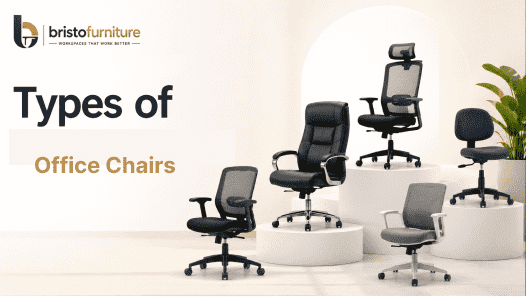
The right office chair can influence how comfortably employees work, how efficiently teams use their work areas, and how well a corporate office supports different job functions. In a modern workplace, seating is not simply about appearance. It needs to work with desks, workstations, meeting areas, reception spaces and the daily routines of employees.
Different departments also have different seating requirements. A senior executive may need a high-back chair with a more substantial profile, while an employee working at a computer for most of the day may benefit from an adjustable task chair. Visitors, meeting participants and training teams require entirely different seating solutions.
This is why understanding the types of office chairs available is important when planning a corporate office. Bristo Furniture provides office furniture solutions designed for commercial workplaces, with its official website highlighting office chairs intended for comfortable daily use and a range of options suited to different office requirements.
For companies planning a complete office interior, seating should also be considered alongside the workstation layout. Bristo Furniture's workstation portfolio includes desking systems, cubicle workstations, 120-degree workstations, L-shape workstations and HAT workstations.
Why Choosing the Right Office Chair Matters
Employees can spend a substantial part of their working day seated, particularly in technology, finance, administration, customer support and other desk-based corporate roles. A chair therefore needs to work as part of the complete workstation rather than being selected independently.
The Occupational Safety and Health Administration (OSHA) notes that a properly designed and adjusted chair can provide support for the back, legs, buttocks and arms while helping reduce awkward postures and unnecessary physical strain. OSHA also recommends considering adjustability, lumbar support, seat dimensions, armrests and a stable five-legged base when evaluating seating.
The relationship between the chair and workstation is equally important. Seat height, desk height, monitor placement and keyboard position should work together so that employees can maintain more neutral working positions.
1. Executive Chairs (High Back)
Executive chairs are designed for leadership offices, managerial spaces and senior corporate positions. Their high-back profile provides a more substantial appearance while offering support across a larger portion of the back.
In addition to their visual presence, executive seating may include features such as adjustable height, reclining mechanisms, padded armrests, lumbar support and a wider seat. The exact configuration should depend on how the chair will be used and the requirements of the individual.
These chairs are often appropriate for:
- Managing director and executive offices
- Senior management cabins
- Board-level work areas
- Private meeting spaces
- Leadership offices
When selecting executive seating, businesses should consider whether its dimensions work with the desk and whether the available adjustments provide a comfortable fit.
2. Ergonomic Task Chairs
Ergonomic task chairs are designed primarily for employees who spend extended periods performing desk-based activities. They focus more heavily on adjustability and workstation compatibility than on executive styling.
Features can include adjustable seat height, back support, seat depth, armrests and recline tension. OSHA's workstation guidance emphasizes that adjustability can help users achieve a better fit and change sitting positions during the working day.
These chairs are particularly relevant for:
- IT teams
- Software development departments
- Finance teams
- Analysts
- Administrative staff
- Customer support teams
- Operations employees
The chair should be selected together with the desk and monitor arrangement. A highly adjustable chair cannot compensate for a poorly planned workstation.
3. Mesh Chairs
Mesh chairs use breathable mesh material across the back and, in some designs, other sections of the chair. They are popular in modern corporate environments because of their lightweight visual appearance and ventilation.
They can work particularly well in open-plan offices where businesses want a contemporary look without making the workspace visually heavy.
Mesh seating can be considered for:
- Open-plan employee areas
- IT offices
- Shared workspaces
- Operations departments
- Modern corporate interiors
The quality of the mesh, frame, lumbar support and adjustment mechanism should be considered rather than selecting a chair solely because of its appearance.
4. Mid-Back Chairs
Mid-back chairs offer a balanced option between compact dimensions and back support. They can be suitable for employees who do not require the taller profile of executive seating.
Their relatively compact design can also help maintain a clean visual appearance across large employee areas. Depending on the configuration, they can be used in individual work areas, departmental offices and smaller corporate spaces.
Mid-back seating can be especially useful when companies need consistent seating across a department while keeping the furniture proportionate to standard workstations.
The key considerations remain seat dimensions, back support, adjustability, armrest positioning and compatibility with the desk.
5. Visitor / Guest Chairs
Visitor chairs serve a different purpose from employee task seating. They are intended for people who enter an office for discussions, appointments, interviews or short meetings.
They are commonly positioned in:
- Executive cabins
- Reception areas
- Managerial offices
- Consultation areas
- Small meeting spaces
Because visitors may use these chairs for shorter periods, the priorities can differ from an employee workstation chair. Stability, appearance, easy maintenance and suitable dimensions become particularly important.
A coordinated visitor chair can also help create a consistent visual identity across the office, particularly when the seating complements executive desks, reception furniture and meeting tables.
6. Conference Room Chairs
Conference room chairs are designed for formal meetings, presentations, reviews and discussions. They need to complement the conference table while providing adequate comfort for meetings that may extend beyond a short conversation.
Their design is often more structured than a typical task chair, with emphasis on appearance, proportions and ease of movement around the table.
When selecting conference seating, companies should consider:
- Table height and dimensions
- Available space around each position
- Number of participants
- Chair width
- Armrest requirements
- Mobility
- Material and maintenance
The chair should not obstruct movement around the conference table. A visually attractive chair is useful, but it also needs to work practically within the room.
7. Training / Cafeteria Chairs
Training and cafeteria seating serves high-use shared areas where chairs may be moved, rearranged or used by different groups throughout the day.
Training rooms may require layouts that change between classroom, group and presentation formats. Cafeteria areas, meanwhile, need seating that is practical for frequent use and easy movement.
For corporate facilities, businesses should consider stackability, durability, ease of cleaning and storage requirements. Lightweight designs can be useful where teams regularly rearrange rooms.
This category is particularly relevant to large offices with dedicated learning areas, employee dining spaces, workshops and internal training facilities.
8. Study / Workstation Chairs
In a corporate environment, study/workstation chairs can be used for individual desk-based activities, shared work areas and focused employee tasks. Unlike residential study seating, the commercial version needs to integrate with an office desk or workstation system.
The chair's height should work with the desk, while the seat and back should provide appropriate support. OSHA recommends arranging the chair and other workstation components so users can maintain neutral positions and avoid unnecessary reaching or bending.
These chairs can be considered for:
- Employee workstations
- Shared desk areas
- Training rooms
- Internal learning spaces
- Computer-based work areas
How to Choose the Right Chair for a Corporate Office
There is no single office chair that works equally well for every employee or every department. The selection should begin with the activity performed in the space.
For employees spending most of their day at computers, adjustability and workstation compatibility should receive more attention. For meeting rooms, proportions and movement around the table may be more important. For visitor areas, appearance, durability and ease of maintenance may take priority.
Businesses should evaluate:
Employee Working Hours
Employees who spend many hours at their desks may require greater adjustability and support than occasional users.
Desk and Workstation Compatibility
The chair should fit comfortably under or around the desk and allow the employee to position their body appropriately in relation to the work surface.
Adjustability
Adjustable seat height, back support and armrests can help accommodate different users. OSHA specifically highlights adjustability as an important consideration when selecting workplace chairs.
Seat Dimensions
Seat depth and width should suit the intended user. OSHA's evaluation guidance recommends checking that the seat supports the thighs without pressing against the back of the knees.
Back Support
A backrest should provide suitable support for the lower back. Adjustable lumbar positioning can be useful where different employees share seating.
Armrests
If armrests are included, their positioning should allow the shoulders to remain relaxed and should not prevent the chair from moving close enough to the desk.
Office Layout
The chair should match the overall workplace design. For example, executive seating may suit private offices, while compact task seating may be more practical for large workstation areas.
Office Chairs and Workstations Should Be Planned Together
One of the most important considerations when furnishing a corporate office is the relationship between seating and workstation design.
A chair cannot be evaluated in isolation. Its height, depth and armrests affect how close an employee can sit to the desk. The desk determines monitor and keyboard positioning, while the workstation layout determines available space for movement.
Bristo Furniture's workstation portfolio includes several commercial configurations, including Desking Systems, Cubicle Workstations, 120 Degree Workstations, L-Shape Workstations and HAT Workstations.
Buying Office Chairs for Corporate Projects
Corporate furniture procurement is different from purchasing a single chair. A business may need seating for dozens or hundreds of employees, along with executive offices, meeting rooms, reception areas and training spaces.
For larger projects, companies should assess:
- Manufacturing capability
- Product consistency
- Material quality
- Customization options
- Bulk-order capacity
- Delivery timelines
- Installation support
- After-sales service
- Compatibility with the planned office layout
Working directly with an experienced office chair manufacturer or supplier can also make it easier to maintain consistency across a large workplace.
For Bangalore-based corporate projects, a local supplier or manufacturer can be particularly useful when site measurements, customization, delivery and installation need to be coordinated with the office interior schedule.
Why Bristo Furniture for Corporate Office Seating?
Bristo Furniture presents itself as an office furniture provider offering tables, workstations, storage and office chairs as part of a broader workplace solution. Its official website highlights tailored solutions, quality and durability, professional craftsmanship and installation support.
The company also identifies itself as an office workstation manufacturer in Bangalore and provides workstation configurations for different corporate requirements.
For businesses planning a complete commercial office, this broader furniture approach can be valuable because seating, workstations, tables and storage need to work together rather than being selected independently.
Final Thoughts
The different types of Office Chairs available today allow businesses to create seating arrangements that match the specific requirements of each corporate space. Executive chairs can add support and presence to leadership offices, task and mesh chairs can suit employee work areas, while visitor, conference, training and cafeteria chairs serve specialized workplace functions.
The most effective approach is to look beyond appearance and consider how each chair will be used. Adjustability, seat dimensions, back support, armrests, desk compatibility and overall office layout all influence the usefulness of workplace seating.
For businesses planning a new office, expansion or refurbishment, selecting chairs together with the workstation and furniture plan can result in a more cohesive and functional workplace.
Bristo Furniture – Corporate Office Furniture Partner
Bristo Furniture provides office furniture solutions for modern commercial workplaces, with offerings covering office chairs, workstations, tables and storage. Businesses looking for an office chair manufacturer, supplier, dealer, wholesale or bulk procurement partner in Bangalore can explore its workplace furniture range and discuss requirements for their corporate project.